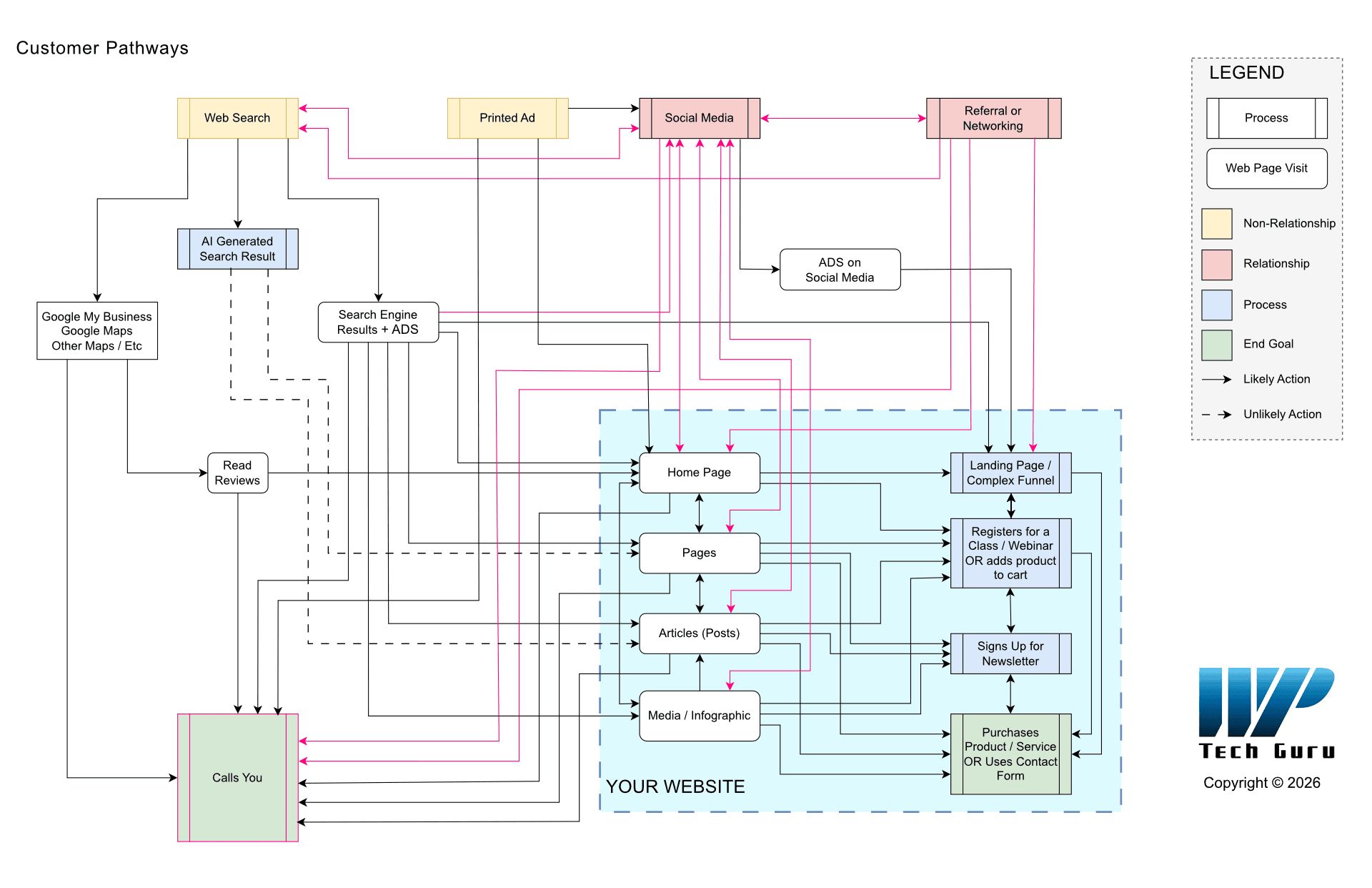
Most companies have not really thought about where their leads actually come from. They are busy trying to do everything. After careful thought and months of work in 2021 (and every year since) I came up with an infographic which shows most customer pathways to get to your product or end up calling you.
I used the term “Customer Pathways” because I never liked the phrase “Customer Journey’. A journey implies that the customer’s direction is kind of random, even whimsical. The truth is if you are an active participant in your marketing then you have influence over the path that your customer takes.
A Big Misconception is That Your Website Generates Leads
I like to think of your website as a salesperson. The lead is generated by: a Web Search, Printed Ads, Social Media or Ads on a Website and lastly by Referral or Networking. The website is the salesperson because it closes the deal or at least introduces the customer to the closer (you). The website has to be convincing enough through conscious and subconscious cues that get the customer to move further either by calling you or by purchasing a product. Sometimes the path is not so short, the customer might sign up for a newsletter first or download a guide and then much later finally decide to call you.
Search Engine Optimization can help your website rank on search engines and can help determine what happens after a visitor ends up on your website.
WP Tech Guru Customer Pathways Infographic Updated 2026-06-15 (click to view Large Version)
This version was updated to show that Social Media can also take you to an Ad and from that Ad they are taken to a landing page or other funnel on your website.
Google users are more likely to end their browsing session entirely after visiting a search page with an AI summary than on pages without a summary.
Pew Research Center
Below you’ll see some items in pink or hot pink. Those show you the power of relationships.
How to Use this Infographic to Understand Your Lead Generation
The best way to use this is to download the PDF version and print a few copies of it. Then use highlighters to answer these questions:
- Which pathways are currently working for you?
- Which pathways might help you improve results?
- Which pathways are a waste of effort or money?
- Who is responsible for certain pathways?
Customer Pathways Infographic Description for People with Disabilities
This is a Flowchart. At the top level are the starting points:
- Web Search
- Printed Ad
- Social Media (including Video)
- Referral (online or in person) or Networking (meeting in person)
From a Web Search the Person Ends Up:
- At Google Maps or other Maps:
From a Map, a customer typically reads reviews then visits your website or calls you. Sometimes they will call you without visiting your website - At an AI Search Result. The dotted lines show that if someone gets an AI Generated Search Result based on your website the likelihood of them arriving at your webpage is very low1 and AI generated content is most likely from a specific article or page on your website. If a user clicks on the sources the AI result is generated from they will likely land on a page or article (post) on your website or a competitor’s website.
- Other Business Listings (Yelp, Bing, Directories, etc.)
From business listings a customer will learn more about your business, reads reviews and either call you or visit your website - Search Engine Results including Ads
From Search Engine Results & Ads, a potential customer will most likely end up on your website home page, landing page, article or social media page. Also a search engine result can take you to an infographic - Calling directly from Search Result phone links or by manually keying in your phone number
From a Printed Ad the Person Ends Up At:
This is the simplest part of the flowchart. The person does one of the following:
- calls you,
- visits your website home page or
- visits your social media profile (or social media business profile)
From Social Media or an Online Ad:
One can Arrive on a Social Media page from the Search Engine Results including ads above. From Social Media or an Ad on a website you would end up:
- A Google Search
- At a website home page
- An Ad which then takes them to a landing page on your website (or another sort of funnel)
- A website page, post or infographic
- Or get a recommendation (Personal Referral)
- A landing page
- Calling you
Referral or Network Meeting
Can lead a customer to:
- A Web Search for your company
- Calls you Directly
- Social Media
- Home Page
- Landing Page (for example if you show them a QR code or even a business card with a link to a specific page or shortened URL that goes to a landing page.
Once at Your Website
- On the normal pages / home page or infographic page a customer can
- Call
- Visit other pages
- End up on a Landing page or other Funnel
- Register for a class / webinar
- Add something to a shopping cart
- Sign up for a Newsletter
- Use a contact form
- Visit Social Media pages
- From a landing page or funnel page a customer can
- Register for a class / webinar
- Buy a product
- Sign up for a Newsletter
- Use a contact form
Funnels can be very simple or complex – this is not intended to show every possibility.
Footnotes
- Chapekis, A., & Lieb, A. (2025, July 22). Google Users Are Less Likely To Click On Links When An AI Summary Appears In The Results. Pew Research Center. Retrieved December 25, 2025, from https://www.pewresearch.org/short-reads/2025/07/22/google-users-are-less-likely-to-click-on-links-when-an-ai-summary-appears-in-the-results/ ↩︎